





What "reinstallation" is and why you may need it:
It is a process in which your server's current disk is formatted and a new OS image is installed on it. So if "everything is broken", "nothing works", you just want to "start over" or you need a different OS, you can make a few clicks in the client area and return the server to the original state it was in when you received it.
Using pre-installed OS templates (images) saves you time: you can quickly deploy a server with the OS you need or return it to its original state without having to install/reinstall the OS manually.
You can reinstall (recreate) your VDS yourself at any time by choosing a suitable OS template, or opt out of using a template (if you want to install the OS yourself, for example when the OS you need is not among the templates available to you or you need some special installation) by choosing the "No template" option.
To reinstall your VDS, do the following:
1. Log in to the VDS control panel
2. Click the name of the current template and select "Change template / Reinstall OS":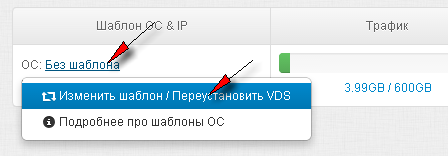
OR select "Reinstall" in the "Server status" section: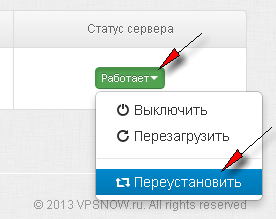
3. Select the desired template, confirm the data loss and click "Reinstall server":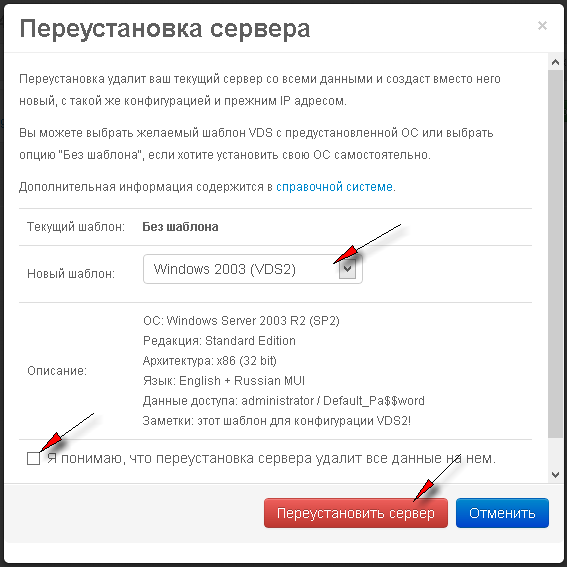
Please note:
- Absolutely all user files and data will be deleted from your server.
- The new access credentials (username and password) are given right in the template description!
- If you had a non-standard OS (installed without a template), you will need to install it again.
- The new access credentials are given in the template description
- Choose the template that matches your server's configuration
Server reinstallation usually takes no more than 15 minutes. When using templates, the first boot may take longer than usual (the OS is being configured, changed hardware is detected, settings are updated, etc.). On first login you will usually need to change the default password; a reboot may be required for the changes to take effect, as well as activation, installing system updates, etc.
- 174 Users Found This Useful
