





How to set up your mailbox so that emails from VPSnow do not end up in spam
To make sure emails from vpsnow.ru never end up in spam, you need to set up a filter in your email service. Below we describe in detail how to do this in the 3 most popular email services in the CIS: Mail.ru, Yandex.ru and Gmail. In other services it works in a similar way, and there is plenty of material on this topic online.
Setting up Mail.ru.
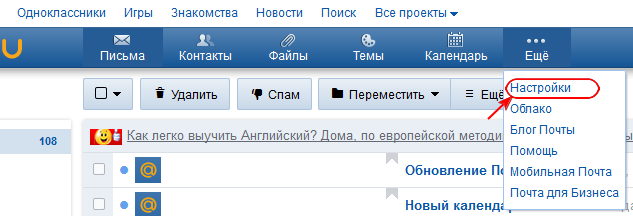
To set up a filter, log in to your mailbox, then click More and select Settings from the drop-down list.
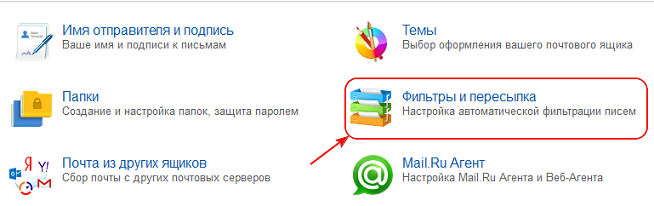
Then, in the window that appears, select Filters and forwarding
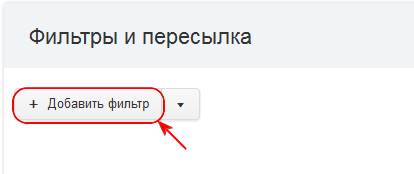
Next, select Add filter
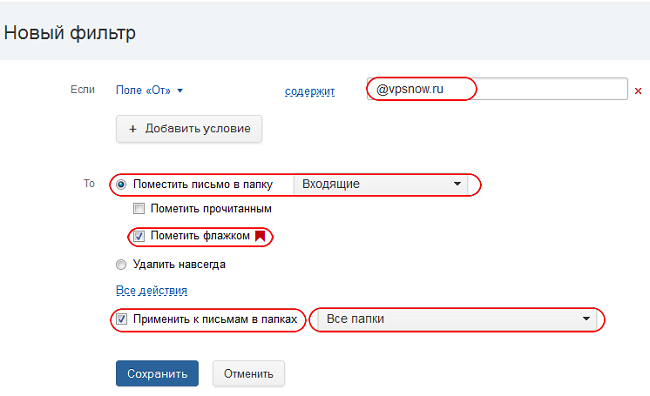
The filter configuration window will open, where you enter the required data
1. In the "From" field, enter @vpsnow.ru.
2. Set Move the message to folder to Inbox.
3. Check the Mark with a flag option.
4. Check the Apply to messages in folder option and select All folders in the drop-down list next to it.
5. Then click Save.
In the next window, make sure the rule is enabled. The setup is complete.
Setting up Yandex.ru
To set up a filter, log in to your mailbox, then click the "gear" icon - All settings and select Message filters from the drop-down list.
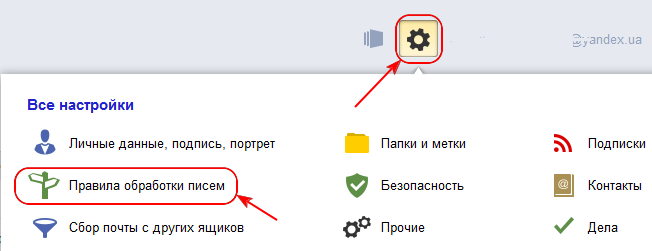
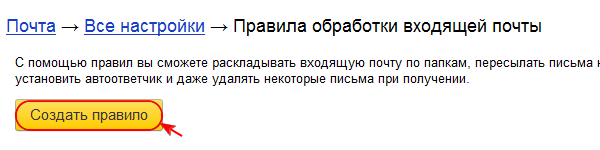
Then, in the window that appears, click Create rule.
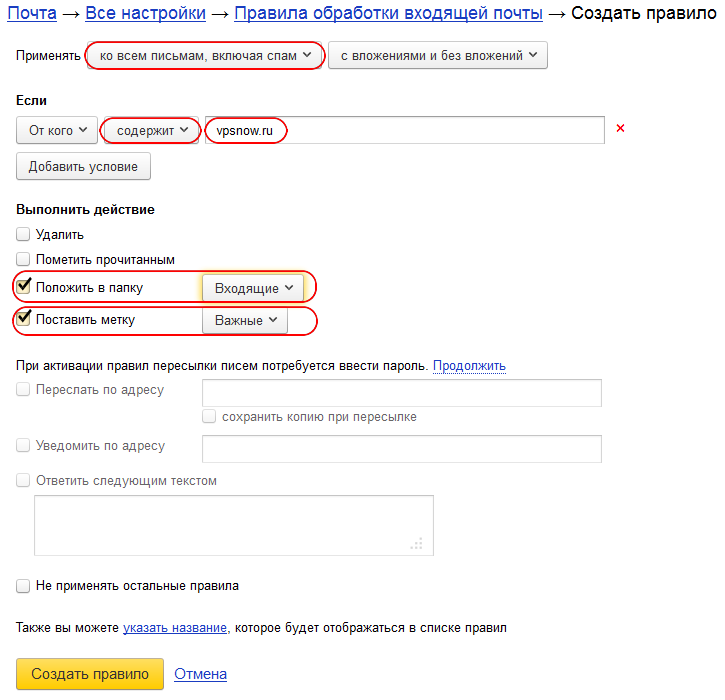
The filter configuration window will open, where you enter the required data
1. Set the Apply option to "to all messages, including spam".
2. In the "From" field, select "contains" and enter vpsnow.ru.
3. Check Move to folder and set it to Inbox.
4. Check Apply label and select Important.
5. Then click Create rule.
Setting up Gmail
To set up a filter, log in to your mailbox, then click the "gear" icon - Settings.
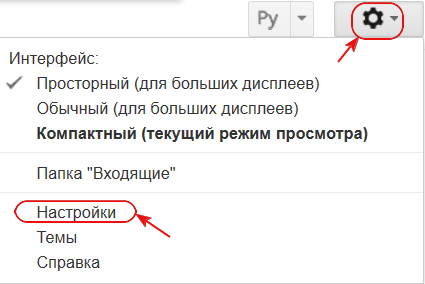
Then, in the window that appears, select the Filters tab

Next, click the Create a new filter link
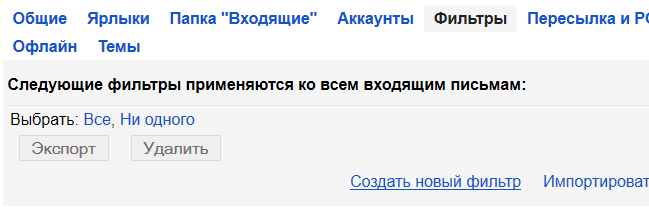
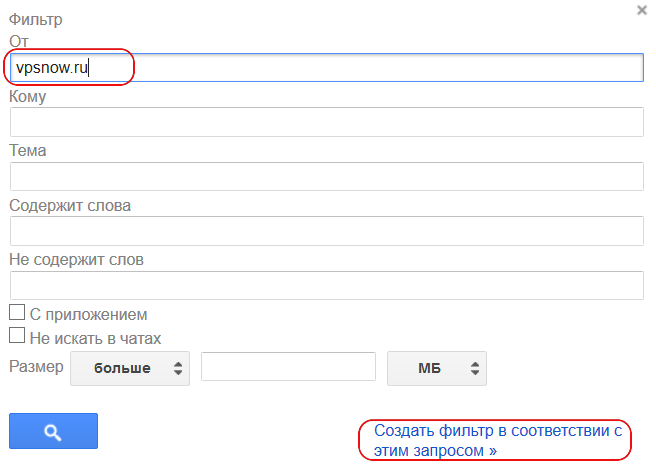
The filter window will open
1. In the "From" field, type vpsnow.ru.
2. Then click the "Create filter with this search" link.
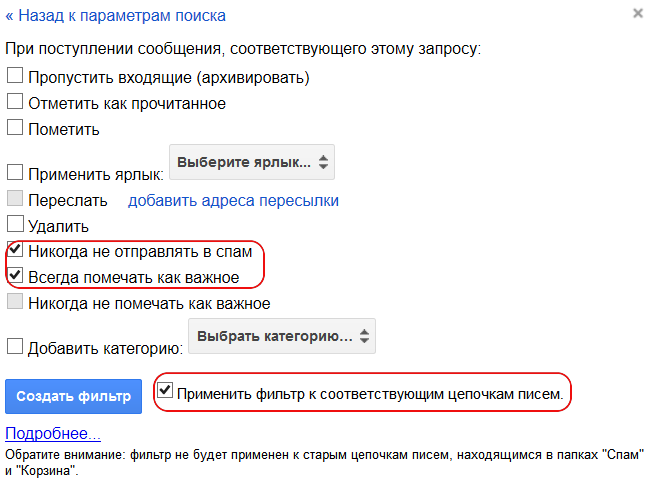
The filter settings form will appear.
1. Check Never send it to Spam and Always mark it as important.
2. Check Also apply filter to matching conversations.
3. Click Create filter.
Setting up Mail.ru.
To set up a filter, log in to your mailbox, then click More and select Settings from the drop-down list.
Then, in the window that appears, select Filters and forwarding
Next, select Add filter
The filter configuration window will open, where you enter the required data
1. In the "From" field, enter @vpsnow.ru.
2. Set Move the message to folder to Inbox.
3. Check the Mark with a flag option.
4. Check the Apply to messages in folder option and select All folders in the drop-down list next to it.
5. Then click Save.
In the next window, make sure the rule is enabled. The setup is complete.
Setting up Yandex.ru
To set up a filter, log in to your mailbox, then click the "gear" icon - All settings and select Message filters from the drop-down list.
Then, in the window that appears, click Create rule.
The filter configuration window will open, where you enter the required data
1. Set the Apply option to "to all messages, including spam".
2. In the "From" field, select "contains" and enter vpsnow.ru.
3. Check Move to folder and set it to Inbox.
4. Check Apply label and select Important.
5. Then click Create rule.
Setting up Gmail
To set up a filter, log in to your mailbox, then click the "gear" icon - Settings.
Then, in the window that appears, select the Filters tab
Next, click the Create a new filter link
The filter window will open
1. In the "From" field, type vpsnow.ru.
2. Then click the "Create filter with this search" link.
The filter settings form will appear.
1. Check Never send it to Spam and Always mark it as important.
2. Check Also apply filter to matching conversations.
3. Click Create filter.
- 135 Users Found This Useful
Related Articles
Extending a logical partition after an HDD upgrade
On Windows Server 2008:1. Make sure the "Virtual Disk" service is running on the server. To do this, run the following commands one after another:
sc config vds start= autonet start vds
2. Open "Server Manager" and select "Storage" -> "Disk...
I want to switch to a different plan. How do I do that?
The ability to upgrade (move to a larger plan) is one of the advantages of virtual servers. You can start with a minimal server configuration and move to more powerful configurations as needed. All your data, programs and settings are preserved....
How is a server blocked?
If your server has been blocked or suspended (due to an overdue abuse complaint, network scanning or late payment), network access to it is blocked, although the server itself keeps running (running programs continue to work, but there is no...
Questions about antivirus protection and firewall on the server
Q: What antivirus protection is installed on the server?
A: An antivirus is not part of the operating system and, accordingly, is not included in its distribution.
Q: Do I need to install additional software (antivirus, firewall, etc.) to...
Tips for contacting technical support
Note: this article is a work in progress and new tips are added to it from time to time.
To have your request processed as quickly as possible, follow the recommendations below. Requests created without following these recommendations will be...
